Posted on Leave a comment

YM3812 Synthesizer

Believe it or not this is a fully functional music synthesizer with fully every possible parameter tweakable and can save presets. The synth sound horrible, but that was by design.

The YM3812 chip is from an old Soundblaster card from back in the Reagan days. This thing sounds like bad dog stuff. It’s so bad it’s fun. I fell in love with this little SPI chip. Designing a full blown synthesizer with hardware interface ended up being a fairly atrocious amount of work, but I was graduated and unemployed. The intention was to take what started out as an Arduino project and move into a legit project.

I ran into problems with this one on the mechanical side. I needed a way for buttons to feel “good” and I needed a user interface that felt sturdy….like I could throw it down the stairs and it not break. Of all theory of magnetic fields and high speed signal propagation I have studied, I had no background in making a product tough. So this is a fully functional synthesizer that worked in prototype mode, but by the time of V2 I was bogged down by the mechanical end and working a full time job. Eventually, it was out of sight and out of mind. I would love to go back now and slaughter this one.

Microcontroller: STM32 Blue Pill

I was really into these STM32 Blue Pills in 2020. They provided tons of bang for the buck, got me into Cortex M3 32-bit land, and were a big step up from the Atmega328p microcontrollers in the Arduino clones I had laying around. The price was basically the same. I ended up ditching the Cortex M3 because when it came time to design PCBs without modules, the MPN: STM32F103C8T6 was very expensive and had a lead time of a billion years due to the supply chain nasties that didn’t really go away until 2023 or so.

2020 = Mechanically Awful!

When I got my job at Macrofab as a “circuit board analyzer”, I had not studied many products for how to “do it”. I was coming from 4 years of aggressive Arduino hobbyist work followed by 4 years of hell in school and trying to put it all together. You can see that here. I just used a 3/4″ wooden box with butt joints as my “enclosure”. It’s one way to do it, but it’s a dumb way.

You can see from this rear view how much empty space I was working with. Granted, for this phase of the prototype it didn’t matter. I was experimenting with board-to-board connections using 2.54mm which was definitely the right track.

Looking at the front with the pretty cover removed, you could see I had 2 PCBs for the switches. This strikes me as expensive at the moment, but I say that about air, too. These front panel PCBs contained the switches but also contained the LEDs that were used to indicate the level/intensity/setting of every possible parameter on the synths.

It makes more sense if you look at what I had planned for the front panel. This would have been a 3U rack, if I remember correctly. My gut says this is a $1,000 product when I look at it. I had temptations to do all of this GUI stuff on a $70 tablet and call it a day. Talk to the main microcontroller through UART / bluetooth / wifi / whatever. That approach would have been radically cheaper.

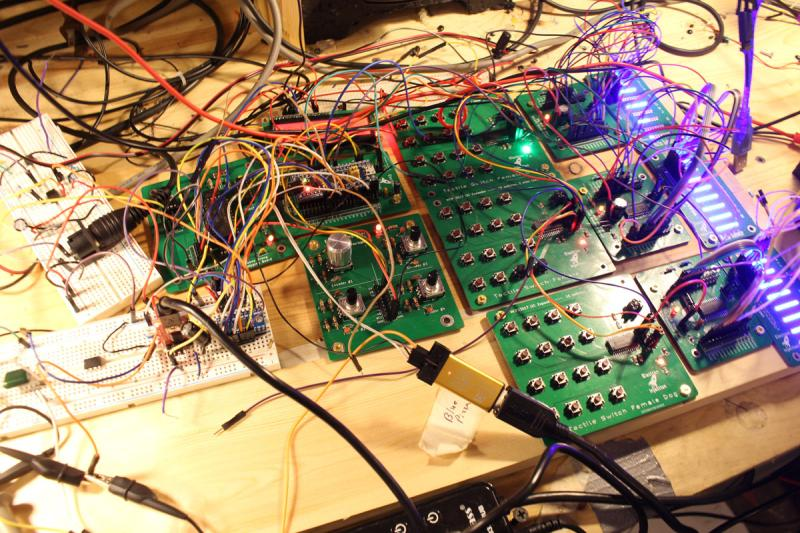
Below is the money shot.

On the far left breadboards you can see old-school MIDI inputs. Just to the right of that is the actual YM3812 audio circuit. I’m trying to remember if I had 2 of these. I believe I did so that I could have more voices. You could argue the point using a primitive junk 80’s chip is to be limited, but my brain doesn’t work that way. I wanted the brain to be awesome. With more voices, I could detune one chip slightly and that allows for all kinds of big, nasty sounds one may hear in supersaw dance land.

Below the 2 YM2812 synth boards is an encoder PCB. It has 4 encoders but I was only using one or two of them. I had built that as a development tool back in the day and got plenty of use out of it on the breadboard.

To the right you can see the PCBs with 16 switches each. These, too, were prototype tools I developed. I need to look up the chip. I used a SPI expander so that I could have a ton of buttons with only only the CS, MOSI, MISO traces.

To the left of that was the TM1640 LED drivers. I need to look up how I drove these LEDs. Now I don’t remember and I’d like to pick my brain. I may have put real thought into this and came up with an interesting solution. I bet I came up with a matrix array thing. I’m not sure how I’d have enough IO otherwise.

On the far right, you can see the blue LEDs that were used to indicate level.

Posted on Leave a comment

MIDI Test Code on Arduino and STM32 Blue Pill

This code turns the onboard PC13 LED of the STM32 Blue Pill on when a MIDI NoteOn message is received and turns the LED off when a MIDI Noteoff message is received. It’s my preferred way to confirm that a MIDI circuit is working. It relies on the Arduino MIDI Library.

#include <MIDI.h>

#define LED PC13 // LED pin on Arduino Uno

MIDI_CREATE_DEFAULT_INSTANCE();

void doSomeStuffWithNoteOn(byte channel, byte pitch, byte velocity);
void NoteOff(byte channel, byte note, byte velocity);

void setup()
{
  pinMode(LED, OUTPUT);
  MIDI.begin();
  MIDI.setHandleNoteOn(doSomeStuffWithNoteOn);
  MIDI.setHandleNoteOff(NoteOff);
}

void loop()
{

  MIDI.read();
}

void doSomeStuffWithNoteOn(byte channel, byte pitch, byte velocity)
{
  // note on code goes here
  digitalWrite(PC13, LOW);
}

void NoteOff(byte channel, byte note, byte velocity)
{
  // note off code goes here
  digitalWrite(PC13, HIGH);
}
Posted on Leave a comment

Blue Pill STM32 Clones Brown Out or Become Unresponsive

The Problem:  The STM32 Blue Pill sometimes dies for no apparent reason.  On the PSU, it’s pulling 30mA and then for now apparent reason, the current draw reduces to 10mA (for the power indicator LED, presumably) and the microcontroller appears dead.  It only seems to occur when powered from a power supply to the 5V pin.   Once it occurs, giving the 3.3V pin power instead appears to do no good.

For some reason, I’ve been able to fix the problem reliability by removing external power and powering the STM32 via the Stlink clone along with the CLK, GND, and IO pins.  Voltage SHOULD be voltage in such a situation, but maybe the IO pin has some kind of effect.  I’m really not sure.  If anyone knows, please pass on why.

I’ve wondered if the problem is some kind of BOR brownout problem, but I haven’t done the work to find out yet.  It only seems to happen with the CS32F103C8T6 STM32 Blue Pill clones (which I currently have 9 of I need to burn through and never buy again.)


Posted on Leave a comment

Smooth Fading LEDs With STM32 Blue Pill on Arduino Platform

The smooth fading of LEDs is possible, but it’s best to have 16 bits to work with and ditch the linear world.

// My code
dutyCycle = pow(1.03, time_increment);

// Math equivalent
y = 1.03^x

Above is the most interesting piece of code today. dutyCycle for this code is a number from 0 – 65535. (16-bit resolution is (2^16 – 1 = 65535).

I have the time_increment set to 10ms. So, basically, we are going to increase the dutycyle by 3% every 10ms. You’ll see below that I settled on 375 steps with each time taking 10ms. By using a time_increment that is set to increase every X milliseconds, it’s easy to control the speed of the fading.

WHY 1.03?

To get the 1.03 value, I worked backward and shot for a ballpark rating of 400 individual steps of brightness. Why? No idea.
After some playing, I figured out that 1.03^375 = 65156. 375 steps works for me. The big rule is we can’t exceed 65535 or the microcontroller will rollover.
To put it another way, 65535 + 1 = 0 in digital land. It’s no different than any other cyclical process. In military time, if you add another minute to 23:59, you get 00:00.
For our purposes, we didn’t want rollover. We want to smoothly fade the LED up to it’s maximum brightness and then back down.

WHY NOT LINEAR?

Much like our ears, eyes have evolved to handle an atrocious level of dynamic range. Such systems play in the world of logs and exponentials (same thing after you flip the graph axis around). It’s one of those scientific marvels that we can make sense of a duty cycle of 65535 and still tell the difference between 500 and 600. In a linear system, we’d have to pick one extreme or the other.

MAKE IT BETTER

It turned out that the dutyCycle code above spent a ton of time in the bottom region. After 50 increments of time, for example, the duty cycle would be 4  (1.03^50 = approx 4). That’s “off” in terms of LED brightness to my eyes. There’s a solution.

Remember that 1.03^375 = 65156. Technically, this wastes a bit of our headroom. We have 65535 to work with and our problem is we are spending too much time down around 0. The lucky fix is to use an offset much like you may have learned (and forgotten) in Alegebra class.

y = mx + b

This is a linear function, but the idea of “b” is the same.  “b” lets us shift our function up our down. We want to shift the whole thing up.   To get our “b” I took 65535 – 65156 to get 379. Let’s just say 375 to be conservative.

// New Code
dutyCycle = pow(1.03, time_increment) + 375;

// Math equivalent
y = 1.03^x + 375.

Now the LEDs do what they are supposed to.  There is not excessive time spent with the LEDs “off”.    So, at time = 0, we end up with a duty cycle of 376. (1 + 375). 376/65535 * 100 = 0.5% actual duty cycle. In reality, this is a brightness of zero. Solved!


#include <Arduino.h>

#define PWM1_pin PA8
#define PWM2_pin PA9
#define PWM3_pin PA10

#define INCREMENTER 100

void CycleA(int pin, int pwm_limit)
{
	int run = 1;
    long timeA = 0;
    int countUp = 1;
    int dutyCycle = 1;
    int time_increment = 0;
    

  while (run == 1)
  {
     
    long currentTime = millis();


    if (pin == 1)
    {
      analogWrite(PWM1_pin, dutyCycle);
    }
    if (pin == 2)
    {
      analogWrite(PWM2_pin, dutyCycle);
    }
        if (pin == 3)
    {
      analogWrite(PWM3_pin, dutyCycle);
    }

    if (currentTime - timeA > 10)
    {
      dutyCycle = pow(1.03, time_increment);
      timeA = currentTime;

      if (dutyCycle > pwm_limit)
      {
        delay(2750);
        //dutyCycle = 1;
        //time_increment = 0;
        countUp = 0;
      }

      if (dutyCycle < 10 && countUp == 0)
      {
        countUp = 1;
        run = 0;
      }

      if (countUp == 1)
      {
        time_increment++;
      }
      else
      {
        time_increment--;
      }
    }
  }
}

void setup()
{

// All PWM pins need to be set as output
// Note:  I've seen multiple examples in which the PWM pins were set to "PWM" instead of "OUTPUT".  I have no explanation for that other than maybe they are using 
// the other guy's STM32-to-Arduino library.
  pinMode(PWM1_pin, OUTPUT);
  pinMode(PWM2_pin, OUTPUT);
  pinMode(PWM3_pin, OUTPUT);
  
  // Change the analogWrite function to operate at 16-bit.  It maxes out at 65535 instead of the 255 of 8-bit.
  analogWriteResolution(16);

}

void loop()
{
 // CycleA(  pin_number,  duty_cycle_limit).
 // This function allows selecting a pin number and sets the duty cycle limit on a scale of 0-65535.
 //  You'll see below that the 10000 for LED Color #1 is there because this was an LED strip that was exceedingly bright.
 //  Basically, the duty_cycle_limit is a brightness limiter.
 
 // I didn't take the time to pass the pin define (PA8, PA9, and PA10) through a function.
 
 // Run LED Sequence for LED Color #1
  CycleA(1, 10000);
  
  // Run LED Sequence for LED Color #2
  CycleA(2, 65000);
  
  // Red LED Sequence for LED Color #3.
  CycleA(3, 65000);
}


Posted on Leave a comment

Microchip 25LC256 EEPROM on STM32 Blue Pill and Arduino

For the big, bad synth project, I needed an EEPROM.  I selected the Microchip 25LC256 from Digikey simply because it had excess capacity (256k) and was thru-hole.   (I always recommend this approach when jumping into a new arena of unpolished prototyping).  I had never worked with external EEPROM before.   It turns out that EEPROM is fairly straight forward.  You pick an address and you write to it.  It’s not all that different from how a file cabinet works.  When you run out of room in one drawer, you move on to the next drawer.  Sometimes you want to put stuff in separate drawers even if they aren’t full.  These”drawers” are known as pages.

The page size in the Microchip 25LC256 is 64 bytes.   At the moment, each preset for my synth requires about 40 bytes, so this means I’m gonna waste 24 bytes per page in the interest of staying organized.  There are many other chips in the 25LCxxx series of varying sizes.  The smaller capacity EEPROM chips use smaller page sizes, which means I’ll need to dedicate multiple pages to each preset.   You’ll see a function to write a 64 byte array to the EEPROM all at once below.  This is significantly faster than writing one byte at a time as there is a 5ms penalty after finishing up the write process no matter if you are writing 1 byte or 64 bytes.

Of course, it took longer than I hoped to effectively use the Microchip 25LC256 EEPROM.  What else is new!    You’ll certainly want to adapt these functions below to suit your needs, but this code does work on an STM32 Blue Pill in PlatformIO using the Arduino framework.  I suspect the critical piece I was missing was slowing down the SPI clock. You’ll see this code uses a clock divider of 16.  According to the datasheet, the larger the Vcc, the faster clock you can get away with.

I’m moving these functions into a dedicated Microchip 25LCxx library which I’ll give away when its ready.  For now, here’s the working code in a rough format.


#include "Arduino.h"

#include <SPI.h>

byte pin_SS2 = PB12;

HardwareSerial Serial3(USART3); // PB11 (RX3)  PB10   (TX3)

void EEPROMsetup()
{
  //SPI_2.begin();
  pinMode(pin_SS2, OUTPUT);
  digitalWrite(pin_SS2, HIGH);
}

byte EEPROMread(uint16_t address)
{
  byte read_buffer = 0;
  digitalWrite(pin_SS2, LOW);
  SPI.transfer(0b00000011);         // Set EEPROM to read mode.
  SPI.transfer16(address);          // Send the 16-bit address
  read_buffer = SPI.transfer(0xFF); // A dummy byte is sent to read the buffer.
  digitalWrite(pin_SS2, HIGH);

  Serial3.print("Reading:  ");
  Serial3.println(read_buffer);
  Serial3.print("Address:  ");
  Serial3.println(address);
  Serial3.println("");

  return read_buffer;
}

void EEPROMwriteByte(uint16_t address, byte value)
{
  digitalWrite(pin_SS2, LOW);
  SPI.transfer(0b00000110); // WREN write enable latch.
  digitalWrite(pin_SS2, HIGH);

  digitalWrite(pin_SS2, LOW);
  SPI.transfer(0b00000010); // WRITE INSTRUCTION
  SPI.transfer16(address);
  SPI.transfer(value);
  digitalWrite(pin_SS2, HIGH);
  delay(5); // Taken from datasheet.  This slows down EEPROMWriteByte a bit, but if a second write is started before the
  // first can be completed, it will ignore the second one.  That's bad.   While the write is in progress, the STATUS register
  // may be read to check the status of the Write-in-process (WIP) bit (Figure 2-6).  I haven't tried that one yet.

  Serial3.println("Write complete");
}

byte EEPROMreadStatus()
{
  byte read_buffer;
  digitalWrite(pin_SS2, LOW);
  SPI.transfer(0b00000101); // Red STATUS register
  read_buffer = SPI.transfer(0xFF); // A dummy byte to read the buffer.
  digitalWrite(pin_SS2, HIGH);
  return read_buffer;
  // Serial3.print("Status:  ");
  // Serial3.println(read_buffer);
  // Serial3.println("");
}

void EEPROMWritePage(uint16_t page_num, byte *save_this_array)
{
  // Pages are 64 bytes.  I'll give each preset a page for simplicity.

  digitalWrite(pin_SS2, LOW);
  SPI.transfer(0b00000110); // WREN write enable latch.
  digitalWrite(pin_SS2, HIGH);
  digitalWrite(pin_SS2, LOW);
  SPI.transfer(0b00000010); // WRITE INSTRUCTION

  SPI.transfer16(page_num * 64); // Send address of page number.  Must start at n * 64.

  for (int i = 0; i < 64; i++)
  {
    SPI.transfer(save_this_array[i]); // WRONG WRONG WRONG WRONG WRONG
  }

  digitalWrite(pin_SS2, HIGH); // close up the write process
  delay(5);                    // See TWC in datasheet https://ww1.microchip.com/downloads/en/DeviceDoc/25AA256-25LC256-256K-SPI-Bus-Serial-EEPROM-20001822H.pdf

  Serial3.println("Page Write complete");

}

void setup()
{
  SPI.begin();
  SPI.setClockDivider(SPI_CLOCK_DIV16); // 72Mhz / 16 = 4.5Mhz
  SPI.setBitOrder(MSBFIRST);

  Serial3.begin(19200); // PB11 (RX)  PB10   (TX)
  Serial3.println("Serial3: 3");
  EEPROMsetup();

  byte preset_arr[64];

  for (int i = 0; i < 64; i++)
  {
    preset_arr[i] = i;
  }

  EEPROMWritePage(0, preset_arr);

  EEPROMWritePage(2, preset_arr);

  // Read Page Two   Page 2 starts at 64*2 and ends at (64*3 - 1)
  for (int i = 128; i < 192; i++)
  {
    EEPROMread(i);
  }

  EEPROMwriteByte(50, 21);
  EEPROMwriteByte(52, 22);
  EEPROMwriteByte(30, 23);

} // end of setup

void loop()
{
  EEPROMread(50);
  EEPROMread(52);
  EEPROMread(30);
  delay(500);
}