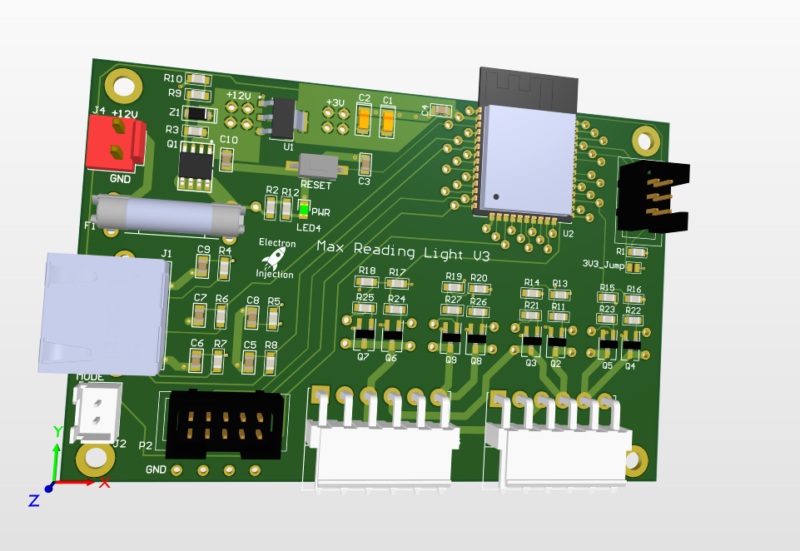
Posted on Leave a comment

Reading Light Bar

Requirements:

  • Diffused RGBW light that is great for reading that can be mounted to the wall
  • Requires different modes of operation. a) Crazy light show b) Adjustable R G B and W light via faders
    • Reading mode should start out at the set brightness and then fade incrementally for an hour until eventually shutting off. You shouldn’t notice the light is getting dimmer.

This was a basic project. The ESP32 is overkill for this, but I had it on hand. For linear faders that are normally used on a mixing console create voltage dividers that are read by the ADC on the ESP32. The light is dimmed with standard PWM and MOSFETs. Fun artifact. My son wanted to know why his ceiling fan was spinning backwards. He learned all about aliasing! Fun stuff. The PWM frequency I chose is just a hair faster than the rotation of the fan. Persistence of vision says humans can see light when it blinks fast enough, but tell that to the fan. It knows!

Lessons Learned

I don’t know what I was thinking! I used a linear regulator to step down from 12V to 3.3V. That’ll never happen again. Dissipating 8V+ when an ESP32 is pulling hefty power for a modern microcontroller is a bad, bad idea. I should have used a switching regulator. People worry about the noise. Fair enough. I worry about melting!

Those hefty VM3.96mm connectors at ref des: J5 and J3 are strong. They are also a bit too snug. They are meant to be plugged in and stayed plugged in. That’s good. The problem is if you ever want to take the connector off. They are kinda terrible. Granted, I’m sure I got these from Ali Express for $0.00001. Maybe you get what you pay for sometimes.

This was a fun little project. The greatest challenge was getting the clearance right on the 3D printed “tracks” for the LEDs.

As always I always struggle with wiring and connectors. The NAME OF CONNECTOR GOES HER wasn’t nearly as handy for plugging and unplugging as I had hoped. I used an RJ45 connector for the ESP32 to talk to the fader. That worked well. The lesson is a consumer-approved connector should always be used for “consumer approved tasks” whatever that means.

Posted on Leave a comment

Controlling PWM With Potentiometer On AtMega328p

This is crude, but the thing works.  We’ve all seen this on the Great Scott Youtube channel (among other places) where a potentiometer controls the duty cycle of a PWM waveform on an oscilloscope.  This version isn’t pretty.  It needs some sanding and painting.  However, it’ll get a person started.  I’m adding it here as my personal library to steal from as needed.  Feel free to do the same.

Most of it is also stolen/borrowed from two main sources.

  1.  AVR Programming book by Make  (p.135)
  2.   AVRFreaks.net forum post 

Hardware Requirements

PC0 is looking for an input voltage ( keep it under 5V!!!!).  I made a voltage divider with a 10k resistor and a 10k pot using the AtMega’s 5V supply.  This will max out at 2.5V so I’m definitely throwing resolution away.

AREF needs 5V, too.  I tossed a random cap across it any GND to reduce some of the nasties.

#include <avr/io.h>
#include <util/delay.h>
#include "pinDefines.h"
#include "USART.h"

static inline void initADC0(void) {
	ADMUX |= (1 << REFS0);  // reference voltage
	ADCSRA |= (1 << ADPS1) | (1 << ADPS0); // ADC clock prescaler /8
	ADCSRA |= (1 << ADEN); // enable ADC } uint16_t divider = 1; void Duty( uint8_t percentage, uint16_t ICR1_value) { percentage = (percentage > 100 ? 100 : (percentage < 0 ? 0 : percentage)); uint16_t OCR = (uint16_t)(((uint32_t)percentage * (uint32_t)ICR1_value)/100) ; // Set pwm percent of pwm period OCR1AH = OCR >> 8;
OCR1AL = OCR & 0xFF;
}

void FrequencyPWM(uint16_t frequency, uint8_t percentage)
{
uint16_t TOP = F_CPU/(divider*frequency) - 1;
ICR1H = TOP >> 8;
ICR1L = TOP & 0xFF;
Duty(percentage, TOP);
}

void PWM1_INIT()
{
DDRB |= (1 << PINB1);
//DDRB |= (1 << PINB2);
// Timer/Counter 1 initialization
// Clock source: System Clock
// Clock value: 62.500 kHz - I changed this to No prescailing using CS12=0, CS11=0, and CS10 = 1
// Mode: Fast PWM top=ICR1
// OC1A output: Non-Inverted PWM
// OC1B output: Non-Inverted PWM
// Noise Canceler: Off
// Input Capture on Falling Edge
// Timer Period: 1 s
// Output Pulse(s):
// OC1A Period: 1 s Width: 0.2 s
// OC1B Period: 1 s Width: 0.40001 s
// Timer1 Overflow Interrupt: Off
// Input Capture Interrupt: Off
// Compare A Match Interrupt: Off
// Compare B Match Interrupt: Off
TCCR1A=(1<<COM1A1) | (0<<COM1A0) | (0<<COM1B1) | (0<<COM1B0) | (1<<WGM11) | (0<<WGM10);
TCCR1B=(0<<ICNC1) | (0<<ICES1) | (1<<WGM13) | (1<<WGM12) | (0<<CS12) | (0<<CS11) | (1<<CS10);
TCNT1H=0x00;
TCNT1L=0x00;

FrequencyPWM(50, 10);
}

int main(void){
	
	PWM1_INIT();
		
	// Inits
	uint16_t adcValue;
	//uint8_t i;
	initADC0();
	initUSART();
	printString("Hello!\r\n");
	
	FrequencyPWM(10000, 50);
	_delay_ms(100);
	
	while(1){
		ADCSRA |= (1 << ADSC);  // start ADC conversion
		loop_until_bit_is_clear(ADCSRA, ADSC);  // wait until finished
		adcValue = ADC; // Read ADC in
		_delay_ms(50);
		transmitByte(adcValue);
		//_delay_ms(1000);
		
		uint8_t scaled_ADC = adcValue / 3;
		FrequencyPWM(10000, scaled_ADC);   // ( frequency , duty cycle % )	
	}	
}