Posted on Leave a comment

Reading Light Bar

Requirements:

  • Diffused RGBW light that is great for reading that can be mounted to the wall
  • Requires different modes of operation. a) Crazy light show b) Adjustable R G B and W light via faders
    • Reading mode should start out at the set brightness and then fade incrementally for an hour until eventually shutting off. You shouldn’t notice the light is getting dimmer.

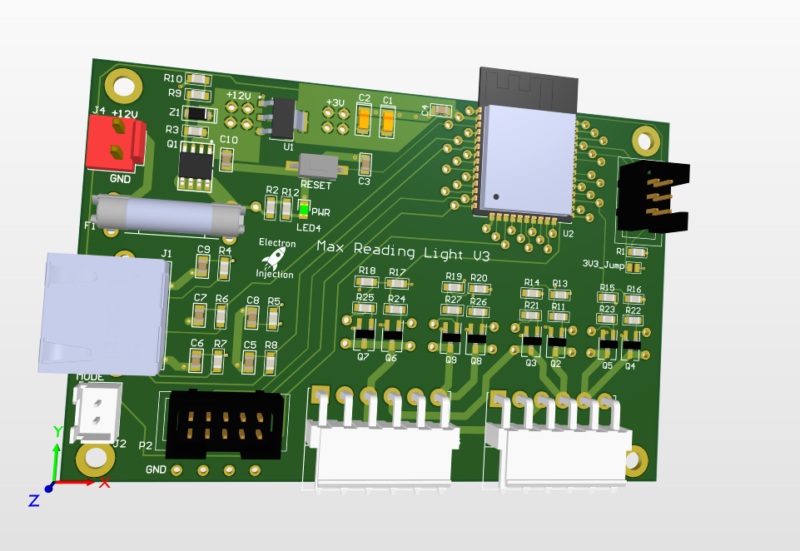
This was a basic project. The ESP32 is overkill for this, but I had it on hand. For linear faders that are normally used on a mixing console create voltage dividers that are read by the ADC on the ESP32. The light is dimmed with standard PWM and MOSFETs. Fun artifact. My son wanted to know why his ceiling fan was spinning backwards. He learned all about aliasing! Fun stuff. The PWM frequency I chose is just a hair faster than the rotation of the fan. Persistence of vision says humans can see light when it blinks fast enough, but tell that to the fan. It knows!

Lessons Learned

I don’t know what I was thinking! I used a linear regulator to step down from 12V to 3.3V. That’ll never happen again. Dissipating 8V+ when an ESP32 is pulling hefty power for a modern microcontroller is a bad, bad idea. I should have used a switching regulator. People worry about the noise. Fair enough. I worry about melting!

Those hefty VM3.96mm connectors at ref des: J5 and J3 are strong. They are also a bit too snug. They are meant to be plugged in and stayed plugged in. That’s good. The problem is if you ever want to take the connector off. They are kinda terrible. Granted, I’m sure I got these from Ali Express for $0.00001. Maybe you get what you pay for sometimes.

This was a fun little project. The greatest challenge was getting the clearance right on the 3D printed “tracks” for the LEDs.

As always I always struggle with wiring and connectors. The NAME OF CONNECTOR GOES HER wasn’t nearly as handy for plugging and unplugging as I had hoped. I used an RJ45 connector for the ESP32 to talk to the fader. That worked well. The lesson is a consumer-approved connector should always be used for “consumer approved tasks” whatever that means.

Posted on Leave a comment

Heating Bed and Nozzle Simultaneously On CR-10 In Cura

On my CR-10, the nozzle heats up and then the bed heats up. This seems like a waste of time particularly in that I need to make sure the first layer of the print goes down correctly. After that, I don’t care. This sequentially heating dramatically increases my time investment in a print.

Warning: I’ve heard that the stock CR-10 power supply is trash and can’t handle this. I’ve been doing it for about a year (hundreds of prints) with no issue. Use at your own risk.

In Cura, go to Settings > Printer > Manage Printer > Machine Settings > Printer

———START G-CODE

M140 S{material_bed_temperature} ; start preheating the bed WITHOUT wait to what is set in Cura

M104 S{material_print_temperature} T0 ; start preheating hotend WITHOUT wait to what is set in Cura

M190 S{material_bed_temperature} ; start heating the bed to what is set in Cura and WAIT

M109 S{material_print_temperature} T0 ; start heating hotend to what is set in Cura and WAIT

M201 X500.00 Y500.00 Z100.00 E5000.00 ;Setup machine max acceleration

M203 X500.00 Y500.00 Z10.00 E50.00 ;Setup machine max feedrate

M204 P500.00 R1000.00 T500.00 ;Setup Print/Retract/Travel acceleration

M205 X8.00 Y8.00 Z0.40 E5.00 ;Setup Jerk

M220 S100 ;Reset Feedrate

M221 S100 ;Reset Flowrate

G28 ;Home

G92 E0 ;Reset Extruder

M92 E98 ; Brando configured extruder e-steps

G1 Z2.0 F3000 ;Move Z Axis up

G1 X10.1 Y20 Z0.28 F5000.0 ;Move to start position

G1 X10.1 Y200.0 Z0.28 F1500.0 E15 ;Draw the first line

G1 X10.4 Y200.0 Z0.28 F5000.0 ;Move to side a little

G1 X10.4 Y20 Z0.28 F1500.0 E30 ;Draw the second line

G92 E0 ;Reset Extruder

G1 Z2.0 F3000 ;Move Z Axis up

——— END G-CODE ————————–

G91 ;Relative positionning

G1 E-2 F2700 ;Retract a bit

G1 E-2 Z0.2 F2400 ;Retract and raise Z

G1 X5 Y5 F3000 ;Wipe out

G1 Z10 ;Raise Z more

G90 ;Absolute positionning

G1 X0 Y{machine_depth} ;Present print

M106 S0 ;Turn-off fan

M104 S0 ;Turn-off hotend

M140 S0 ;Turn-off bed

M84 X Y E ;Disable all steppers but Z